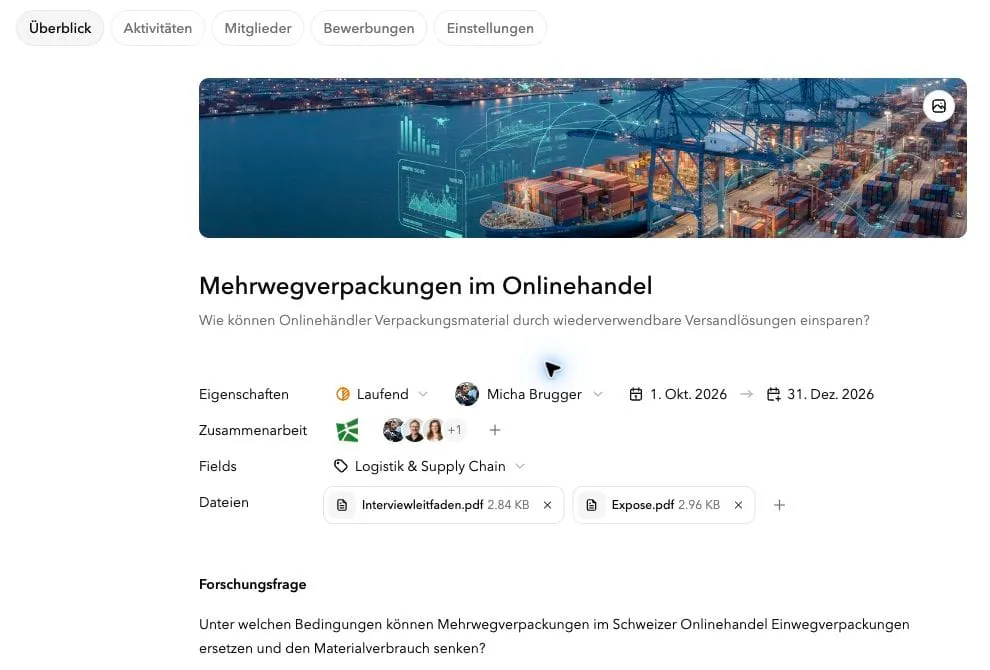
With Studyond’s new Projects feature, you can organise your bachelor’s thesis, master’s thesis, semester assignment or other project in one place and work on it with others. Create your project once, describe what you want to do and invite the people involved. Your supervisor, industry partners and interview participants can find the latest documents there. Depending on their role, they can read about your work or help edit the project and join the discussion. That means less time sending documents, explaining the current state of your work or piecing together information from different chats and emails.
From the first draft to the finished project
Your supervisor still has the old proposal. Your industry partner is waiting for the revised research question. Before your next interview, you need to gather all your documents again.
With Studyond, you keep the current state of your work in the project itself.
Update your research question, replace your proposal or add new documents. People with access to your project can find the latest version there. Feedback and questions from project members stay with the project too.
An example
You are working on a semester project investigating how companies can reduce packaging material.
You need an industry partner, two experts to interview and feedback from your supervisor.
Create your project on Studyond, describe your research question and add your initial documents. You can then:
- send a topic proposal to a company and link your project directly,
- invite interview participants and project partners so they can familiarise themselves with your work,
- apply for a published topic using your existing project.
Use the same project for every request. You do not need to put the description and documents together again each time.
As your work develops, so does your project
After the first conversations, it becomes clear that “reducing packaging material” is too broad. You decide to focus on reusable packaging in online retail.
Update the research question in your project and add your revised proposal. Your supervisor, industry partner and invited interview participants with project access can see the new version there.
Update the project once, instead of sending new versions to different people.
Discuss the work where it happens
As a project member, your supervisor gives feedback on the revised research question. Your industry partner explains which company data is available. You ask which of those data you can use for the study.
The discussion stays in the project. Even when several people are involved, you can follow what feedback refers to and what has already been discussed.
Short check-ins also let you share where things stand and where you need support:
The first interviews are complete. To compare the packaging options, I still need figures on return rates and the number of reuse cycles. I need input from the industry partner on this.
This keeps project members informed about progress, open questions and next steps.
Keep track of what has happened
When did the research question change? When did feedback arrive? What changed afterwards?
The automatic activity log records changes and important events. Together with comments and check-ins, it creates a history of your project that you can follow.
People who join later as project members can get up to speed more quickly too.
More than bachelor’s and master’s theses
Studyond started with thesis projects. The new Projects feature lets you create different kinds of projects, including:
- bachelor’s and master’s theses
- semester assignments and group projects
- research projects
- projects with industry partners
- larger collaborations
Start with an initial idea or bring a project that is already underway.
Your project stays with you from the first request through ongoing collaboration.